Posts

MIT App Inventor - How to render larger data sets efficiently using RecyclerList Extension - Advanced Guide

Image
In this guide I will show you how to render larger data sets using RecyclerList extension and how to create a custom search bar to filter data. In the specific example as database I used a Google Spreadsheet with 5 columns and 1.200 rows but I have tested it with even bigger databases and worked with no problem.  For those we are not familiar with dynamic components please read first the  RecyclerList - Basic guide The result is ... Extensions used in this project  Recycler List  by  Zain Ul Hassan  ListUtils   by  Zain Ul Hassan  to filter data  Enhance extesnion   by Kevinkun  to create stylish cardviews  TextBox extension  by Pura Vida Apps in order to use on textbox change event ClickZ extension  by Aquib Khan to add click event to cardviews and Image Loader   by  Ayoub Mounchid to load images asynchronous  Lets start. Go to  http://ai2.appinventor.mit.edu/ and create a new project  ...

MIT App Inventor - How to use RecyclerList extension - Basic guide

Image
RecyclerList extension makes it easy to efficiently display large sets of data. You supply the data and define how each item looks, and then the RecyclerView library dynamically creates the elements when they're needed. As the name implies, RecyclerView  recycles  those individual elements. When an item scrolls off the screen, RecyclerView doesn't destroy its view. Instead, RecyclerView reuses the view for new items that have scrolled onscreen. This reuse improves app’s performance and responsiveness. In this guide I will show you how to use RecyclerList extension   created by Zain UI Hassan   with MIT App Inventor Lets's start, go to http://ai2.appinventor.mit.edu/ and create a new project and  In Designer View 1) Import the extension to your project 2) Add a ListView component and hide it - This requirement is needed only when using AI2 otherwise the app will crash  3) Create your layout, for example I will use a list that will contain clients names and ...

Εύκολη αναβάθμιση της offline έκδοσης του AppyBuilder με το Tortoisegit

Image
Σε προηγούμενο post είδαμε πως μπορούμε να κατεβάσουμε την offline έκδοση του AppyBuilder από το GitHub και πως θα την τρέξουμε στα Windows 10. Τώρα θα δούμε πώς μπορούμε να την κατεβάσουμε χρησιμοποιώντας ένα git client , ο οποίος μας δίνει την δυνατότητα να ελέγχουμε για αλλαγές - updates  στο κώδικα και να κατεβάζουμε μόνο τα αρχεία που έχουν αλλάξει στον ήδη υπάρχοντα φάκελλο. Πρώτα όμως είναι απαραίτητο  να κατεβάσετε, αν δεν την έχετε, την τελευταία έκδοση του GIT για Windows και να την κάνετε εγκατάσταση . Μετά μπορείτε να χρησιμοποίησετε για client το Tortoisegit , το οποίο μπορείται να το κατεβάσετε από εδώ  . Αφού το κάνετε εγκατάσταση στον υπολογιστή σας ακολουθείτε τα παρακάτω βήματα για να κατεβάσετε την offline έκδοση του AppyBuilder . Πηγαίνετε στο  https://github.com/AppyBuilder/AppyBuilderPersonal  , πατάτε στο κουμπί Clone or Download και αντιγράφετε - copy την url διεύθυνση Ανοίγουμε την εξερεύνηση αρχείων - file ...

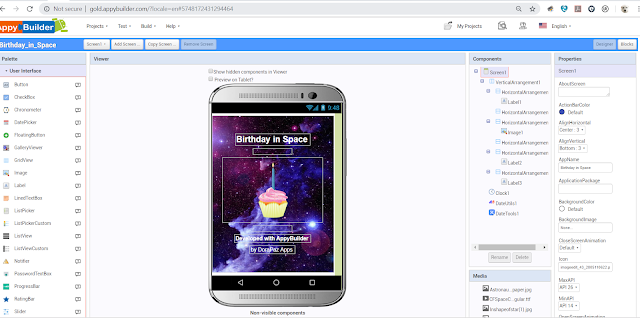
Birthday in Space App

Image
   Επηρεασμένη από το θέμα του φετινού διαγωνισμού, ΙΝΤΟ ΟΡΒΙΤ, του First Lego League, σκέφτηκα,  να φτιάξω μια εφαρμογή που να υπολογίζει την ηλικία μας τόσο στην Γή όσο και στους υπόλοιπους πλανήτες.     Η εφαρμογή μου  Birthday in Space προς το παρόν υπολογίζει την ηλικία σε μέρες και έτη στους εξής πλανήτες Γή Ερμής Αφροδιτη Άρη Δία Ποσειδώνα Κρόνο  Ουρανό Δεν έβαλα τον Πλούτωνα, γιατί το 2006, η Διεθνής Αστρονομική Ένωση αποφάσισε να μη θεωρείται πλανήτης ο Πλούτωνας, αλλά πλανήτης νάνος. Η όλη εφαρμογή στηρίζεται στις τροχιές των πλανητών και στις περιόδους περιστροφής του κάθε πλανήτη. Πλανήτες Περίοδος Περιστροφής σε ημέρες Γής Τροχιά σε ημέρες Γής Ερμής 58,646 87,97 Αφροδίτη 243,018 224,70 Γή 0,99726968 365,26 Άρης 1,026 1,8808476 χρόνια Δίας 0,41354 11,862615 χρόνια Κρόνος 0,444 29,4474...

Πρώτη επαφή με το MIT app Inventor 2

Image
Φέτος στην διάρκεια μιας επίσκεψης μου στο ΑΠΘ έμαθα για το συγκεκριμένο πρόγραμμα του MIT,  το MIT app Inventor 2  που δίνει την δυνατότητα ακόμα και σε παιδιά να φτιάχνουν android εφαρμογές και αποφάσισα να το δοκιμάσω. Στα επόμενα post μου θα σας το παρουσιάσω αναλυτικά μαζί με παραδείγματα εφαρμογών που μπορείται να δημιουργήσετε.